
Quick Start Guide
This guide will get you up and running with Kubently in under 10 minutes.
Prerequisites
Before you begin, ensure you have:
- A Kubernetes cluster (Kind, Minikube, EKS, GKE, etc.)
kubectlandhelminstalled- Node.js 18+ (for the CLI)
Step 1: Deploy Kubently
We recommend deploying Kubently via Helm.
# Clone the repository to get the chart
git clone https://github.com/kubently/kubently.git
cd kubently

# Create namespace
kubectl create namespace kubently

# Create LLM API Key Secret (Replace with your actual key)
# Supported providers: ANTHROPIC_API_KEY, OPENAI_API_KEY, GOOGLE_API_KEY
kubectl create secret generic kubently-llm-secrets \
  --from-literal=ANTHROPIC_API_KEY=sk-ant-your-key-here \
  --namespace kubently

# Create Redis password secret
kubectl create secret generic kubently-redis-password \
  --from-literal=password="$(openssl rand -base64 32)" \
  --namespace kubently

# Generate executor token
export EXECUTOR_TOKEN=$(openssl rand -hex 32)

# Install with Helm (includes API + Executor)
helm install kubently ./deployment/helm/kubently \
  --namespace kubently \
  --set executor.enabled=true \
  --set executor.clusterId=local \
  --set executor.apiUrl=http://kubently-api:8080 \
  --set executor.token="${EXECUTOR_TOKEN}"
Step 2: Verify Installation
Ensure the system is running and healthy.
# Wait for pods to be ready
kubectl wait --for=condition=Ready pod -l app.kubernetes.io/name=kubently -n kubently --timeout=300s

# Port-forward the API (to make it accessible to the CLI)
kubectl port-forward -n kubently svc/kubently-api 8080:8080
Note: In a production environment, you would typically expose the service via an Ingress rather than using port-forwarding.
Step 3: Install and Configure the CLI
Install the CLI
# Install from npm (recommended)
npm i -g @kubently/cli

# Or use npx without installing
npx @kubently/cli --help
Tip: Using
npx @kubently/clilets you run the CLI without a global install - great for quick testing!
Configure the CLI
# Initialize configuration interactively
kubently init

# You'll be prompted for:
# - API URL: http://localhost:8080 (default)
# - API Key: (Leave blank if you haven't configured CLI-specific auth yet)
Step 4: Start Your First Debug Session
Interactive Debugging
Start an interactive session to troubleshoot your cluster:
# Start debug mode
kubently debug
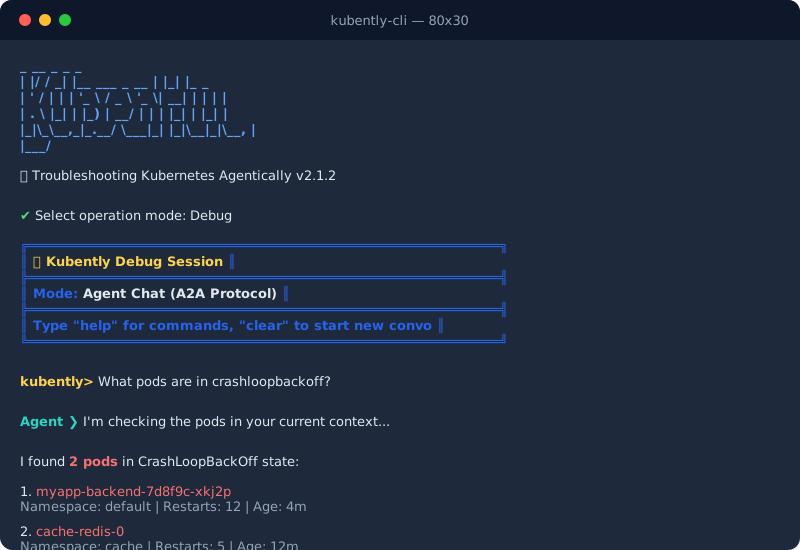
You can now ask natural language questions like:
“What pods are running in the kube-system namespace?” “Are there any pods in a CrashLoopBackOff state?” “Check the logs for the api-server pod.”
CLI Commands
Use discrete commands for quick checks:
# List registered clusters
kubently cluster list

# Check status
kubently cluster status default
Next Steps
Now that you have Kubently running:
- Read the Installation Guide - For production deployment details.
- Read the CLI Guide - Complete CLI documentation.
- Explore the API Reference - Build custom integrations.